A board profile defines the FPGA target your gateware builds for. Boards may offer varying clock options, GPIO availability and types, as well as resource constraints. Select one with target_profile in the gateware's peripheral.yaml file.
via-devkit
via-devkit targets the user-programmable FPGA on the Via devkit, which is left open for your peripherals. The rest of the board (a second FPGA and the two BLE radios) ships as fixed production binaries. When you build a peripheral, this profile supplies the device part, the clock, the pin seed, and the encrypted transport IP that connects your module to the host.
Use target_profile: via-devkit in peripheral.yaml to select it.
FPGA
| Property | Value |
|---|---|
| Part | LIFCL-17-9SG72C (Lattice CrossLink-NX-17) |
| Package | QFN72 |
| Speed grade | 9 |
| Logic | 16,640 LUTs |
| Block RAM | 432 KB |
Your peripheral shares the FPGA with the SDK's transport logic, so the LUT and BRAM budgets above cover the whole device.
Clocking
The peripheral clock clk runs at 40 MHz.
Peripheral capacity
| Property | Value |
|---|---|
| Max user peripherals | 8 |
| ID window | 0xF001..0xFFFE |
| Nested switches | Not supported |
When you add a peripheral to peripheral.yaml, the codegen wires it into the design; 8 is the hard limit.
Toolchain
| Tool | Version |
|---|---|
| Lattice Radiant | 2024.2 (2024.1 also accepted) |
| Questa (simulation) | 2024.x |
Set build.radiant_version in peripheral.yaml to one of the accepted versions. The build runs Radiant inside the gateware container, so you do not install it locally.
IO
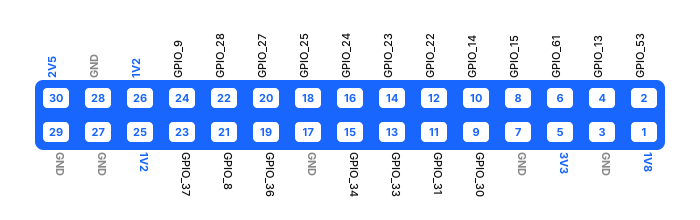
The user-programmable FPGA can be connected to external systems using the connector on the bottom side of the board. 19 FPGA pins are routed to this connector general-purpose I/O, as are several supply pins. The rest of the connector is power and ground. In the pinout below they are shown as GPIO_n, where n is the FPGA pin number. This pin number is used in the peripheral.yaml in the pin declaration section.
| Connector pin | FPGA pin | FPGA pad | Bank |
|---|---|---|---|
| 2 | 53 | PT65B | 0 |
| 4 | 13 | PB16B | 5 |
| 6 | 61 | PT57A | 0 |
| 8 | 15 | PB18B | 5 |
| 9 | 30 | PB66A | 3 |
| 10 | 14 | PB16A | 5 |
| 11 | 31 | PB66B | 3 |
| 12 | 22 | PB56A | 3 |
| 13 | 33 | PB68A | 3 |
| 14 | 23 | PB56B | 3 |
| 15 | 34 | PB68B | 3 |
| 16 | 24 | PB60A | 3 |
| 18 | 25 | PB60B | 3 |
| 19 | 36 | PB70A | 3 |
| 20 | 27 | PB64A | 3 |
| 21 * | 8 | PB30B | 5 |
| 22 | 28 | PB64B | 3 |
| 23 | 37 | PB70B | 3 |
| 24 * | 9 | PB30A | 5 |
* J1 pins 21 and 24 pass through 66% voltage dividers between the FPGA and the connector.
By default, I/O on bank 3 have a 1.2V logic level, and I/O on bank 0 and 5 have a 1.8V logic level. This can be changed if needed — please contact Science Corporation for more details.
Connector pinout
The connector has the following pinout when viewed from the bottom side of the PCB. The board edge is parallel with the pin 1-29 side of the connector.