Physical Dimensions
The SciFi 1 headstage measures 66.00 mm top to bottom, 17.50 mm front to back, and 56 mm side to side.
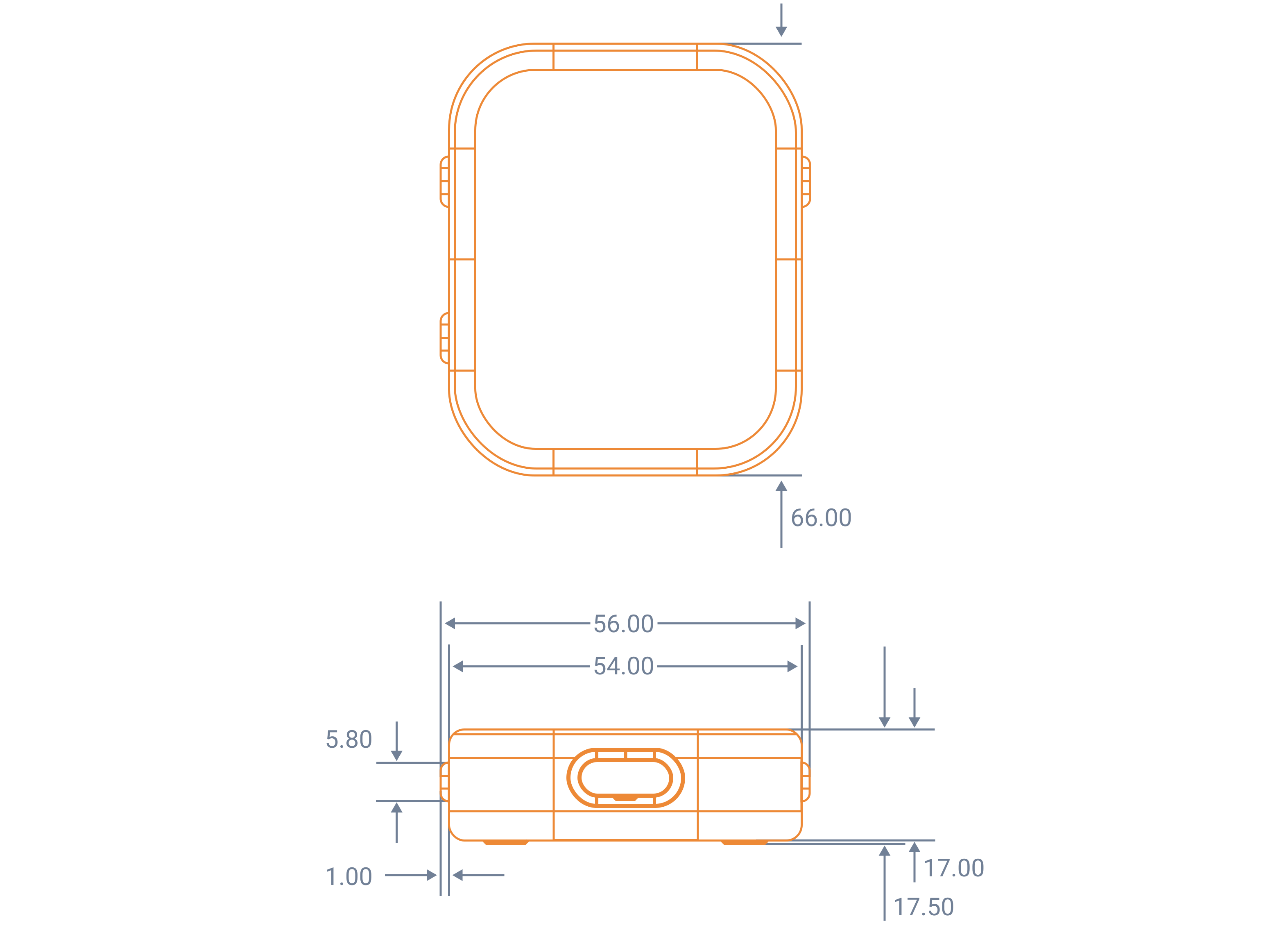
Summary Table
| Body | Dimensions | 66 x 17.5 x 56 mm |
| 2.20 x 2.60 x 0.69 in | ||
| Display | Display technology | AMOLED, 60 Hz |
| Viewing angle | 160 degrees | |
| Resolution | 368 x 448 | |
| Brightness | 350 nits | |
| Contrast | 100000:1 | |
| Diagonal | 45.21 mm | |
| Wireless Connectivity | WLAN | 802.11 ax 160 MHz (5 GHz only) |
| Max PHY rate | 2.4 Gbps * | |
| Iperf: Max up-link TCP | 850 Mbps * | |
| Iperf: Max down-link TCP | 850 Mbps * | |
| Probe Connectivity | Physical interface | USB-C |
| USB Spec | USB 3.2 Gen 1 (5 Gbps) | |
| Compatible probes | Science Axon Probes or any probe with a standard Omnetics or Cereport connector using a Science Axon probe adapter | |
| Battery | Battery capacity | 1400 mAh |
| Safety features | Undervoltage, overcurrent, JEITA battery charging | |
| Battery life | 2–4 hours in active use or 9 hours idle | |
| Storage | Storage capacity | 128 GB |
| Approx. storage capacity (full bandwidth Axon record) | 120 minutes ** | |
| Platform | OS | Linux Ubuntu |
* Ideal conditions: minimal RF noise and interference and local WiFi router with minimal traffic.
** Based on 512 channel, 16 kHz, 12-bit, 100 GB free storage
Interfaces
| Button | Function |
|---|---|
| Up/Down | Navigate between options on the AMOLED screen. |
| Power/Select | Holding the power button serves to turn on and off the device, with short presses serving as a select key. |
| LED Status Ring | The LED status ring can express a wide range of intuitive status information and can be customized to fit your own experiment goals like:
|

Hardware Requirements
In order to make use of SciFi 1, you will require the following:
- USB-C data cable (5 Gbps minimum)
- A WiFi network capable of WiFi 5 (802.11ac) or later. For best performance, use WiFi 6 (802.11ax 160MHz)
- A PC running the synapsectl command line tool
- Science Axon Probes or any probe with a standard Omnetics or Cereport connector using a Science Axon probe adapter
Synapse Device Details
Peripheral IDs
Peripheral IDs bind physical or virtual peripherals to nodes such as Broadband Source and Optical Stimulation.
100–199(1xx) identify hardware peripherals.1000and above identify virtual peripherals.2–99are reserved for commands that select a peripheral dynamically.
The only currently defined command ID is 2. It selects the lowest-ID peripheral that can provide a broadband source.
Settings
| Setting | Type and values | Default | Behavior |
|---|---|---|---|
name | String, 1–255 characters | scifi | Sets the user-facing device name, persists it to the boot configuration, and updates device discovery. |
time_source | Enum: TIME_SOURCE_STEADY_CLOCK or TIME_SOURCE_SAMPLE_COUNTER | TIME_SOURCE_SAMPLE_COUNTER | Selects how recording peripherals timestamp samples. The steady clock uses a monotonic device clock; the sample counter derives timestamps from sequence number and sample rate. |
fpga_clock_freq_hz | Integer: 40000000, 80000000, or 160000000 | 80000000 | Sets the FPGA clock used by supported recording and stimulation peripherals. |
per_network_mac_address | Boolean | true | When enabled, WiFi uses a different stable MAC address for each network. When disabled, it uses the fixed hardware MAC. A change takes effect on the next WiFi reconnect. |
Reserved Folders
| Folder | Purpose |
|---|---|
/models | Stores user-deployed machine learning models that Synapse Apps can use. |
/data | Stores files created by Disk Writer nodes. |
Storage Devices
| Storage Device | Location |
|---|---|
| Disk | The built-in disk storage on the device. |